
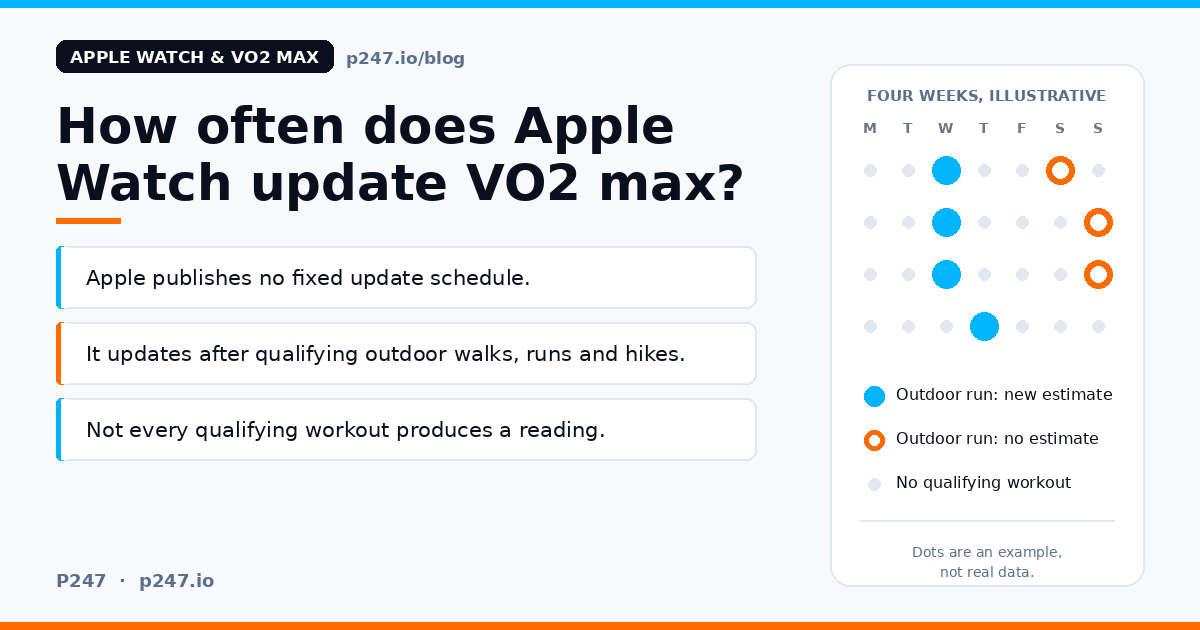
There is no fixed schedule: Apple doesn’t publish one, and your Apple Watch only estimates VO2 max (Apple calls it Cardio Fitness) from outdoor walk, run and hike workouts that meet its conditions. To get a new reading, do a steady Outdoor Walk, Outdoor Run or Hiking workout in the Workout app, on mostly flat ground with a good GPS and heart rate signal, then check Health, Browse, Heart, Cardio Fitness.
That’s the whole answer. The rest of this post is the detail Apple’s pages leave out, and where I’m filling a gap with my own opinion I’ll say so.
- Timing depends on your workouts, not a timer. If you do no qualifying workouts, you shouldn’t expect a new estimate.
- Not every qualifying workout produces an estimate. In Apple’s own study, roughly four in five outdoor walks, runs and hikes did.
- You can’t force one. The only manual prompt Apple offers is an “Update Your Data” button, and it only appears when Health decides your earlier estimates could be improved.
This post is about timing and how to trigger a reading. If you want the full fix checklist for a number that has stopped moving, that’s in Apple Watch VO2 max not updating or recording? How to fix it. If your number moves around and you’re wondering why, see Why does my VO2 max keep changing?.
What Apple actually says about timing
Apple’s Track your cardio fitness levels page is the main source, and it says very little about timing:
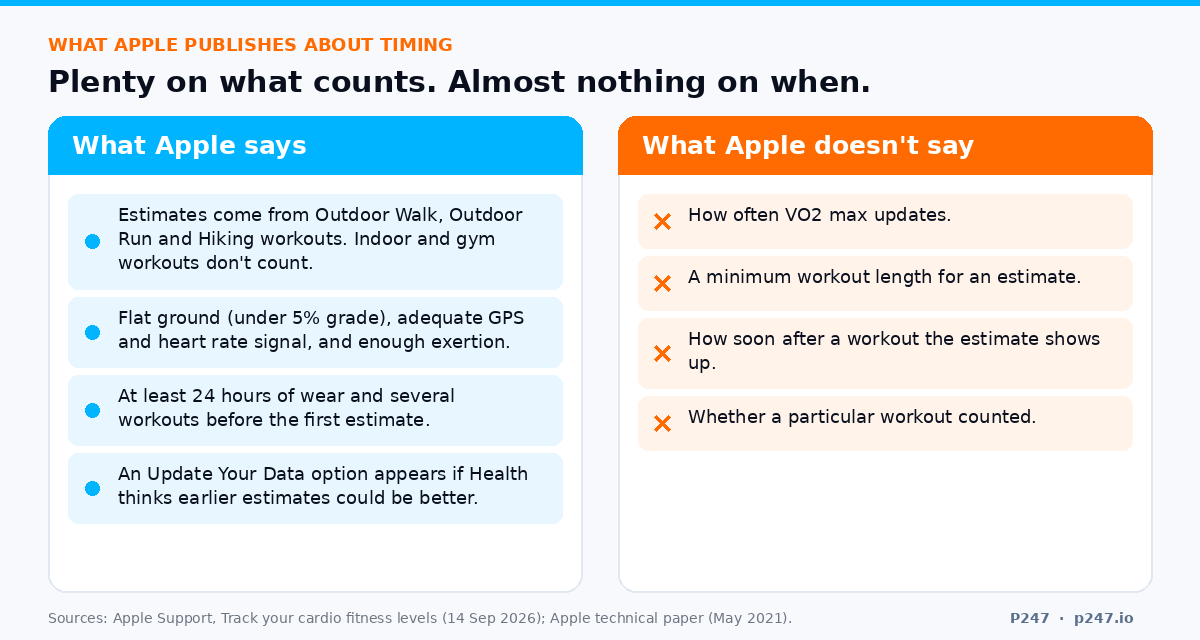
- The estimate comes from how hard your heart is working during outdoor workouts in the Workout app, such as Outdoor Walk, Outdoor Run and Hiking. Indoor workouts, including ones on gym equipment, don’t count.
- You need Apple Watch Series 3 or later.
- Before your first estimate, it can take at least 24 hours of wearing the watch, followed by several qualifying workouts and “passive measurements”.
- If Health detects that your earlier estimates could be more accurate, you can tap Update under Update Your Data in Cardio Fitness.
That’s it. There is no “every X days”, no “after every run”, and no minimum workout length on that page.
Apple’s technical paper, Using Apple Watch to Estimate Cardio Fitness with VO2 max, gives more. It says a value may be generated after walking, running or hiking outdoors on relatively flat ground (a grade under 5 percent), with adequate GPS and heart rate signal quality, and enough exertion, which it defines as roughly a 30 percent increase on the range between your resting and maximum heart rate. The paper also says a user’s first such workout won’t generate an estimate.
It’s worth knowing how old that paper is. It’s dated May 2021 and describes the watchOS 7 algorithm, and it lists a VO2 max range of 14 to 60 mL/kg/min where Apple’s current support page says 14 to 65. So Apple has changed things since, and I’d treat the paper’s detail as a guide to how the feature works, not as a current spec.
Not every qualifying workout produces an estimate
This is the part that surprises people. You can do the right workout and still not get a new number.
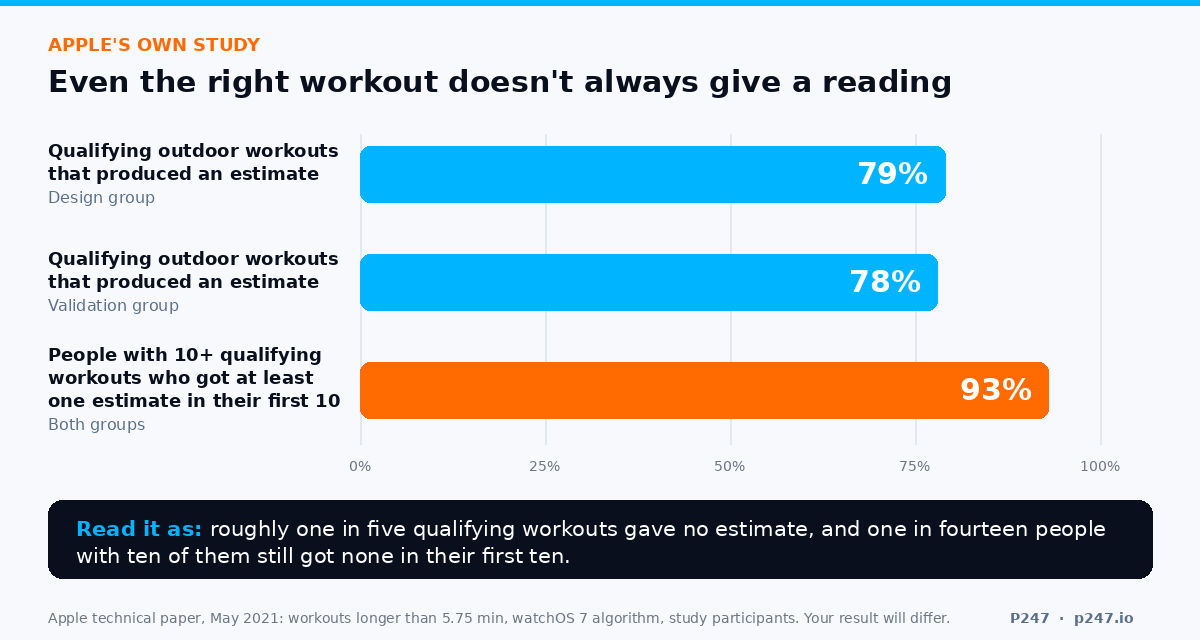
Apple’s paper reports how often that happened in its study. Of outdoor walking, running and hiking workouts longer than about 5.75 minutes, 79 percent (design group) and 78 percent (validation group) produced an estimate. And of participants who completed at least 10 such workouts, 93 percent received at least one estimate within their first 10.
Read that carefully:
- It’s a 2021 study of a specific group, with an older version of the algorithm, so your hit rate could be higher or lower.
- It confirms the point. Even with the right workout type, Apple’s own numbers show roughly one in five didn’t produce an estimate.
- Apple’s advice is more of the same. The paper says that increasing the number of outdoor pedestrian workouts increases the likelihood and accuracy of an estimate, and that accuracy also improves with higher exertion and by wearing the watch consistently throughout the day.
The same paper reports how much one person’s estimates moved around: among participants with at least five estimates, the median standard deviation per person was 1.2 mL/kg/min (about 3.4 to 3.7 percent), and 2.6 at the 90th percentile. So a point or so of wobble between estimates isn’t a fault. The reasons behind it are in the post on why your estimate keeps changing.
How I’d get a new reading
Apple gives no recipe, so this is a practical routine built from what Apple does say. The parts that are my own judgement are marked.
1. Pick the right workout. Start an Outdoor Walk, Outdoor Run or Hiking workout in the Workout app. A treadmill run, a bike ride, a HYROX session or a gym workout won’t do it, even if it was the hardest effort of your week.
2. Choose flat ground. Apple’s paper specifies under 5 percent grade. A hilly loop or steep trail is the wrong choice for this particular job.
3. Keep it steady and give it some time. Apple publishes no minimum duration. Its study counted workouts longer than about 5.75 minutes. My rule of thumb: aim for 20 to 30 minutes of steady effort, because a short or stop-start session gives the algorithm less to work with.
4. You don’t have to go hard. The exertion Apple describes is about 30 percent of the way from your resting heart rate to your maximum. With made-up numbers, say a resting rate of 55 and a maximum of 180, that’s roughly 37 beats above resting, so around 92 bpm. That’s brisk-walk territory for many people. Apple also says higher exertion improves accuracy, so a steady, comfortably firm run is a sensible target. Nothing here asks you to race.
5. Check the basics before you head out. Health Details up to date, Wrist Detection on, Heart Rate on in the watch’s Privacy settings, and the watch snug on top of your wrist. The detail is in the fix checklist, and Apple’s own pages are Get the most accurate measurements using your Apple Watch and Calibrate your Apple Watch.
6. Don’t reset your calibration to “fix” it. Apple says calibration helps the watch learn your fitness level and stride. I can’t see any reason to wipe it just to chase a number.
7. Do it regularly. Because Apple says more outdoor pedestrian workouts means a better chance of an estimate, one flat, steady outdoor run or brisk walk a week is the least I’d do if I wanted the number to stay current. That frequency is my suggestion, not Apple’s.
If your week is gym sessions, sleds, intervals on the treadmill and long rides, the watch has nothing to use. Almost all of that training is invisible to Cardio Fitness. A single weekly outdoor run is the simplest way to feed it, though that’s my suggestion and Apple doesn’t promise a result. And if you’d rather not change your training to suit an algorithm, that’s a fair choice. You’d just have a VO2 max number that updates less often.
There’s also Update Your Data. When Health thinks your earlier estimates could be more accurate, Apple says you’ll see an Update option in Cardio Fitness. Tapping it updates your data, and a Cardio Fitness Data Updated notification then shows how your estimates changed. Apple doesn’t document a way to summon it on demand, but if it’s there, tap it.
How to check whether it updated
- Open Health on your iPhone, tap Browse, then Heart, then Cardio Fitness.
- Use the D, W, M, 6M and Y tabs to see your average over different periods.
- For individual records with dates, scroll to Options and tap Show All Data. That’s Apple’s general method for viewing the records behind a Health data type, so look there to see whether a new estimate arrived after your last qualifying workout.
- Under Options, Data Sources & Access shows which devices and apps contribute to that data type.
- If you check it often, tap Pin to Summary so it shows on your Summary screen.
Apple doesn’t say how soon after a workout an estimate appears. So I’d let the workout sync to your iPhone and give it a day before deciding it didn’t count. (That’s my caution, not Apple’s.)
Quick answers to the other things people search
Where is VO2 max on Apple Watch? It lives in the Health app on your iPhone: Health, Browse, Heart, Cardio Fitness (Apple).
How do I enable VO2 max on Apple Watch? There’s no recording switch. Apple says the watch estimates it from qualifying outdoor workouts. What you can turn on is the low Cardio Fitness notification, in the Apple Watch app on your iPhone under My Watch, Apps, Heart, Cardio Fitness Notifications. Apple’s heart health guide has the steps.
Why is my cardio fitness not updating? The first thing to check is whether you’ve done a qualifying workout recently: outdoor, flat, steady. After that, the usual suspects are in the fix checklist.
Why did VO2 max disappear from Apple Health? I can’t find an Apple page that explains it, so I can’t give you a verified cause. Two things are worth checking. First, switch from the Day tab to M, 6M or Y, because a day with no estimate will look empty. Second, Apple’s Health data page says that deleting Health records, for example with Delete All under Show All Data, removes them, and that deleting on one device removes the data from the other devices on the same iCloud account. If the history really is gone and you didn’t delete it, I’d contact Apple Support.
Why is my Apple Watch VO2 max so low? Apple’s paper says factors that raise heart rate, such as dehydration, caffeine, extreme heat or a recent move to high altitude, can lead to underestimates. So can carrying significant extra weight, running on sand, or an incorrect age, sex or weight in Health. There’s more, including independent research, in the low VO2 max section of the main guide.
The point
Apple Watch doesn’t update VO2 max on a timer. It updates when you give it a qualifying outdoor workout, and even then, not every time. Apple is vague about the rest: no interval, no minimum length, no promise about when it appears. I’d rather say that than make up a number.
So the practical rule is short. Do a flat, steady outdoor walk, run or hike now and then, check Cardio Fitness in Health, and judge the trend over weeks, not one reading.
A VO2 max estimate is only useful next to everything else going on in your training. P247 reads the data your Apple Watch already puts into Apple Health, VO2 max included, and Strava as well if you connect it. Each morning there’s a daily brief with a recovery score built from your own trends, using fixed rules rather than AI, and each week a report for the bigger calls: what is working, what is holding you back, and what to change. If you want to talk a trend through, you can ask the AI coach.
Your first report is free. P247 is available now on the App Store, with Android to follow in 2027. Get it here.
Sources, all from Apple: Track your cardio fitness levels (published 14 September 2026), Using Apple Watch to Estimate Cardio Fitness with VO2 max (May 2021), Get the most accurate measurements using your Apple Watch, Calibrate your Apple Watch, View your data in Health on iPhone, Manage Health data and Monitor your heart health on Apple Watch.
P247 is available now on the App Store. Connect Apple Health and get your first weekly performance report free.