
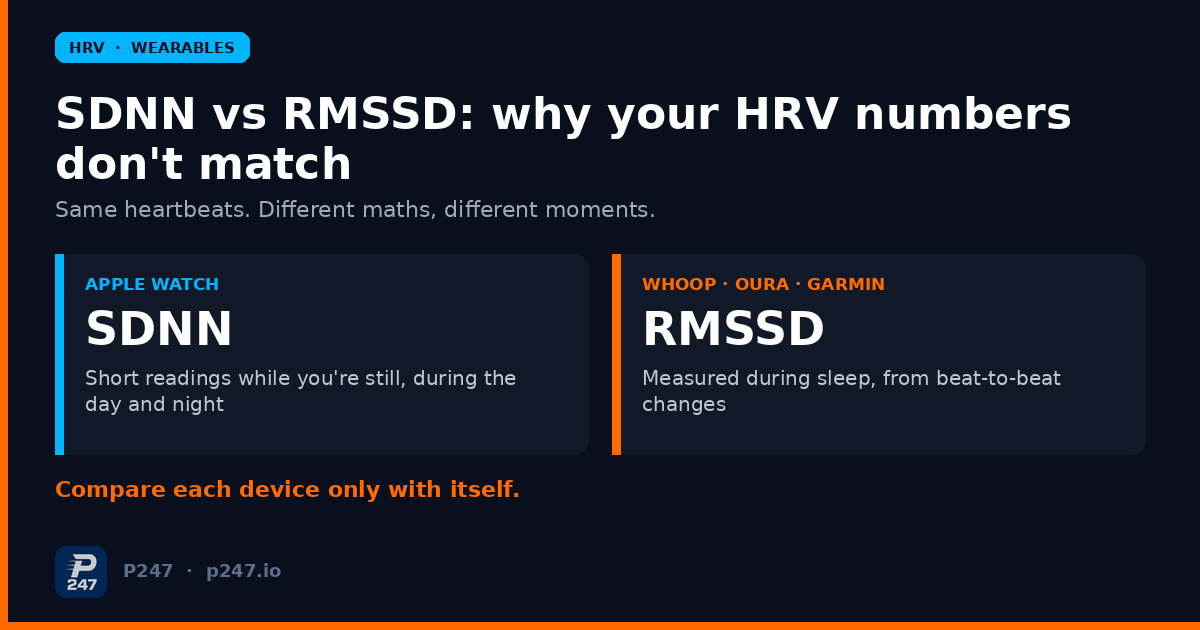
If your Apple Watch says your HRV is one number and your WHOOP, Oura or Garmin says something quite different for the same night, neither device is necessarily broken. They’re usually not measuring the same thing.
Apple Watch stores heart rate variability in Apple Health as SDNN, from short readings taken when you happen to be still. WHOOP, Oura and Garmin report RMSSD, worked out from heartbeats recorded while you sleep. Different maths, different moments, different numbers. Both are in milliseconds, which is exactly why it’s so easy to compare them when you shouldn’t.
I’ve worn more than one device at a time for a while now, and this is the question I see most often from other athletes. Here’s what each number means, why they don’t line up, and how I use HRV without getting tripped up.
Short answers
Is SDNN or RMSSD better? Neither is “better” in general. They describe different things. RMSSD is the main time-domain measure used to estimate the fast, vagally driven (“rest and digest”) changes in heart rate, which is why most recovery wearables use it. SDNN reflects both branches of the nervous system and slower swings too. For tracking your own recovery, the more important thing is that you use one metric, from one device, measured the same way each time.
Can I convert my Apple Watch SDNN into RMSSD? Not from the single number. They’re different calculations on the beat-to-beat data, and you can’t get one from the other. Apple does store the underlying beat-to-beat measurements in HealthKit alongside SDNN, which is how some apps calculate other HRV metrics, but your SDNN value on its own can’t be turned into an RMSSD value.
What is log HRV? It’s an HRV value, usually RMSSD, after taking the natural logarithm (often written ln RMSSD). Researchers do this because raw HRV values aren’t normally distributed, and the log version behaves better statistically. It’s a research and coaching tool. It doesn’t change what your watch is measuring.
What SDNN and RMSSD actually measure
Both start from the same raw material: the time between one heartbeat and the next, in milliseconds. “NN” means normal-to-normal intervals, with irregular beats removed. Then they ask different questions of that list.
- SDNN is the standard deviation of those intervals. It asks: how spread out were the gaps between beats over this recording? Slow drifts in heart rate count as much as fast beat-to-beat changes.
- RMSSD is the root mean square of the successive differences. It asks: how much does each gap differ from the one straight after it? That makes it mostly about fast, breath-linked changes.
In their widely cited overview of HRV metrics, Fred Shaffer and J.P. Ginsberg describe RMSSD as the primary time-domain measure used to estimate vagally mediated changes in HRV, and say both sympathetic and parasympathetic activity contribute to SDNN. They also stress that recording length matters: 24-hour, short-term (around 5 minutes) and ultra-short (under 5 minutes) values aren’t interchangeable.
The easiest way to see the difference is with a toy example. These are made-up beat intervals, five beats each, purely to show the arithmetic:
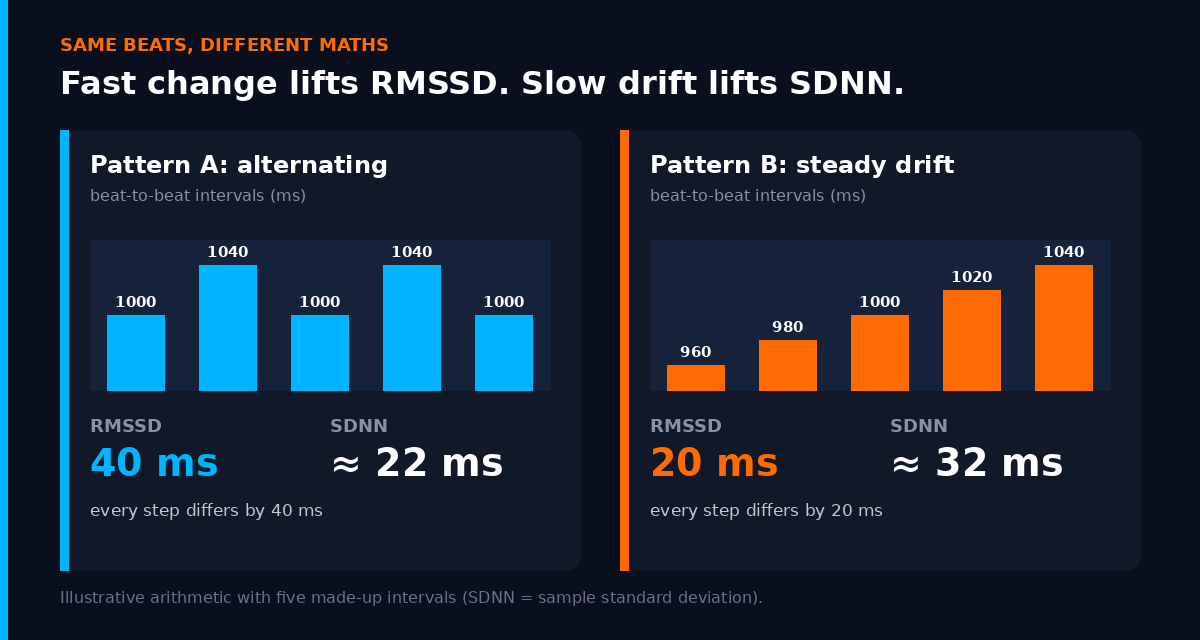
- Pattern A flips back and forth: 1000, 1040, 1000, 1040, 1000 ms. Every gap differs from the next by 40 ms, so RMSSD is 40 ms. The overall spread is small, so SDNN is only about 22 ms.
- Pattern B drifts steadily: 960, 980, 1000, 1020, 1040 ms. Each step is only 20 ms, so RMSSD is 20 ms. But the spread from start to finish is bigger, so SDNN is about 32 ms.
Same five beats per pattern, same units, and the two metrics rank them in opposite order. That’s the core reason an SDNN number and an RMSSD number shouldn’t be compared, even before you get to when and how each device measures.
How each device measures HRV
The maths is only half the story. The other half is timing.
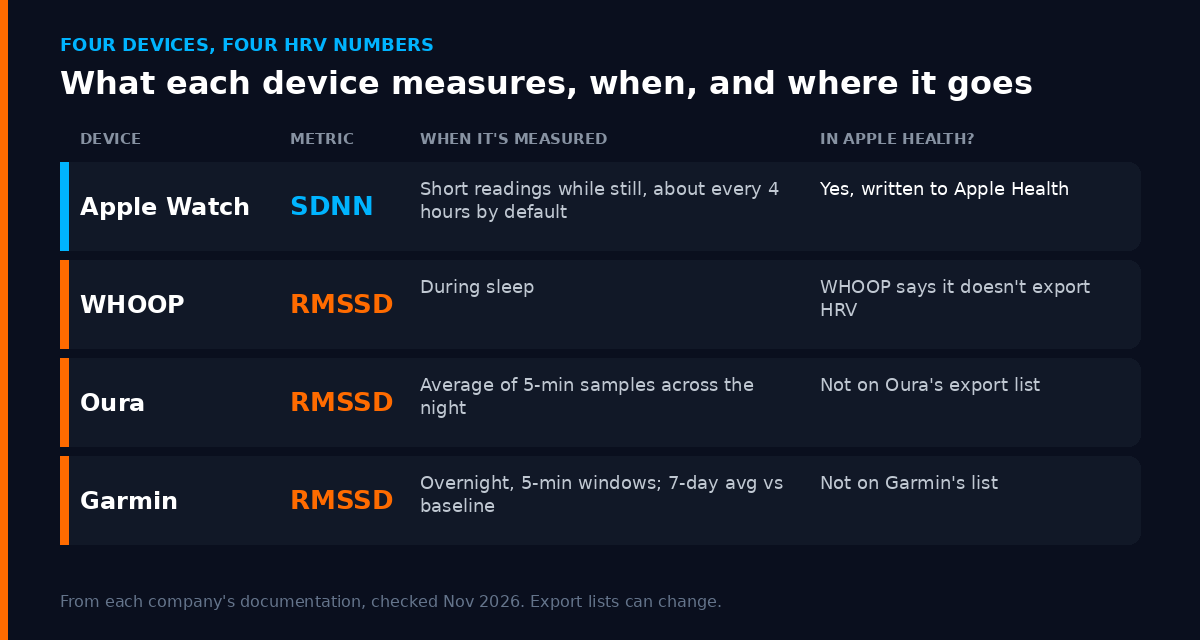
Apple Watch. Apple’s HealthKit documentation says HealthKit uses SDNN. Apple’s heart rate validation paper explains that the watch captures beat-to-beat recordings in the background only when you’re still enough, with a default cadence of every four hours (more often if you’ve turned on irregular rhythm notifications or AFib History), and also during a Breathe session in the Mindfulness app. So your Apple Health HRV for a day is a handful of spot readings, taken at different times, under different conditions. A reading in a quiet moment before bed and one grabbed while you sat still after a stressful meeting aren’t the same kind of sample.
Apple has also added a separate Recovery HRV on Apple Watch Series 12 and Ultra 4. Apple’s support page says it’s sampled while you’re still and the number of measurements varies with your activity level. That page doesn’t say which calculation it uses, so I treat it as its own series rather than splicing it onto years of older Apple Health HRV.
WHOOP. WHOOP’s own HRV guide says it calculates RMSSD and measures it during sleep, deliberately, because daytime readings are full of noise. The same article says plainly that HRV values aren’t comparable across devices that use different measurement windows and sometimes different indices. Credit to WHOOP for saying so.
Oura. Oura’s help page says it measures HRV only during sleep, takes five-minute samples through the night, and shows you the average of all of them, plus your highest sample. Oura’s blog states that RMSSD is the metric used in the Oura app.
Garmin. Garmin’s HRV Status page names RMSSD and describes overnight measurement in five-minute windows. HRV Status itself is built on your seven-day average compared with a personal baseline range, which needs around three weeks of overnight wear to become fully active.
So even the three RMSSD devices differ. A whole-night average of five-minute windows is not the same as a value taken from a particular part of your sleep, and different sensors and filtering add their own differences on top.
The Apple Health catch most people miss
If you wear an Apple Watch, the HRV in Apple Health is the watch’s SDNN.
If you don’t, the HRV row in Apple Health may be empty, even if your other device measures HRV every night:
- WHOOP explains that Apple Health stores HRV as SDNN while WHOOP calculates RMSSD, and doesn’t export HRV to Apple Health. I covered this in WHOOP or Oura for endurance athletes.
- Oura’s Apple Health export list includes heart rate, sleep and respiratory rate, but not HRV.
- Garmin’s Apple Health support page lists what Garmin Connect sends to Apple Health, and HRV isn’t on it.
In other words, your ring or strap’s sleep and heart rate data can reach Apple Health, but its HRV usually stays in its own app. If you wear an Apple Watch as well, the HRV you see in Apple Health is the watch’s SDNN, not your ring or strap’s RMSSD. Don’t read one as a check on the other.
What “log HRV” is, and whether you need it
You’ll see ln RMSSD (sometimes “lnRMSSD” or “log HRV”) in research and some HRV apps. Shaffer and Ginsberg note that HRV values are often expressed as the natural logarithm to get a more normal distribution, which matters when you’re doing statistics on them.
In sport, Daniel Plews and colleagues used a 7-day rolling average of ln RMSSD and its day-to-day variation to follow two elite triathletes over 77 days. In the athlete who became non-functionally overreached, the rolling average trended down towards the key race, while it stayed stable in the other athlete. It’s a case study of two people, so it’s a demonstration, not proof. The same group’s 2013 review in Sports Medicine argued for appropriate averaging techniques rather than reacting to single readings, and noted that in elite athletes both rises and falls in HRV have been linked to poor adaptation.
Do you need to calculate it yourself? I don’t. The useful idea is the one underneath it: look at a rolling average and how much your readings bounce around, rather than this morning’s number.
How I use HRV without being fooled by it
1. Pick one device for HRV and stick with it. I compare a device only with its own history. If I switch devices, or get a new model, I treat it as a new series and give it a few weeks before reading anything into it.
2. Don’t compare SDNN with RMSSD. Not between my watch and someone else’s ring, and not between my own watch and ring. Same unit, different measurement.
3. Look at the trend, not the day. A single low reading after a hard session, a short night or a couple of drinks is normal. A run of nights below my usual range, especially with a higher resting heart rate and sessions feeling harder, is what gets my attention. I wrote more about that in why your HRV trend matters more than today’s number and HRV and overtraining.
4. Be suspicious of daytime spot readings. With an Apple Watch, one day’s HRV can depend on when you happened to be still. I’d rather look at several days than react to one odd value.
5. Don’t chase a number from a chart or a mate. Both WHOOP and Oura say to compare HRV only with your own history, and I agree. In my fifties, my HRV is not going to look like a 25-year-old’s, and that’s not a training problem.
If you want the short versions, there are glossary entries for HRV, SDNN and RMSSD. For how the big three turn HRV into a single score, see Oura vs WHOOP vs Garmin.
Where P247 fits
P247 reads your health data from Apple Health, and your workouts from Strava as well if you choose to connect it. That means the HRV it sees is what’s in Apple Health, which for most people is Apple Watch SDNN. HRV is one input to P247’s daily recovery score, which is built on fixed rules, not AI. Separately, P247’s HRV status compares each night with your own recent values from the same measurement source, so readings from different sources aren’t mixed into one baseline. That’s the same principle as this post: compare like with like.
I’m still building P247 and writing up what I learn along the way. If that’s useful, you can read more at p247.io.
This is general information, not medical advice. HRV from consumer wearables isn’t a diagnostic test. If you have symptoms or a heart condition, talk to a doctor.